Payreq Response
The receiving VASP needs to construct an invoice for the sending VASP for the correct amount and
then return a valid
PayReqResponse. The SDK can help with this process. First, we'll need an
implementation of the UmaInvoiceCreator interface.class IUmaInvoiceCreator(ABC):
@abstractmethod
def create_uma_invoice(
self,
amount_msats: int,
metadata: str,
receiver_identifier: Optional[str],
) -> str:
pass
This can use any node implementation in practice, but if you're using the Lightspark SDK for your node, it's super simple.
class LightsparkInvoiceCreator(IUmaInvoiceCreator):
  def __init__(self, client: LightsparkClient, config: Config) -> None:
    super().__init__()
    self.client = client
    self.config = config

  def create_uma_invoice(
    self,
    amount_msats: int,
    metadata: str,
    receiver_identifier: Optional[str],
  ) -> str:
    return self.client.create_uma_invoice(
      node_id=self.config.node_id,
      amount_msats=amount_msats,
      metadata=metadata,
      expiry_secs=600,  # expiry of 10 minutes. Will likely be shorter in real-world scenarios.
      signing_private_key=self.config.get_signing_privkey(),
      # hashed with a monthly rotated seed and used for anonymized
      # analysis. To disable analytics, you can omit passing the
      # receiver_identifier
      receiver_identifier=receiver_identifier,
    ).data.encoded_payment_request

# Assuming you've loaded your API configuration into a variable
# named config...
lightspark_client = lightspark.LightsparkSyncClient(config.api_client_id, config.api_client_secret)
invoice_creator=LightsparkInvoiceCreator(self.lightspark_client, self.config)
From there, we can use this invoice creator and the SDK to construct the
PayReqResponse.# The receiver's utxos might be used by the sending VASP to pre-screen
* the transaction with their compliance provider. This function is
# implementation-specific and need to be written by you.
receiver_utxos = get_node_utxos(receiver_identity)
# If known, the public key of the receiver's node. If supported by the
# sending VASP's compliance provider, this will be used to pre-screen
# the sender's UTXOs for compliance purposes. This function is
# implementation-specific and need to be written by you.
receiver_node_pubkey = get_node_pubKey(receiver_identity)
# This callback is the URL path that the sending VASP will call to send
# UTXOs of the channel that the sender used to receive the payment once
# it completes. See the "Sending the Payment & Post-transaction Hooks"
# section for more info.
utxo_callback = "https://vasp2.com/api/uma/utxocallback?txid=" + transaction_id
# You can populate payee data based on what was requested in the pay
# request.
payee_data = {
CounterpartyDataKeys.NAME.value: "Alice",
CounterpartyDataKeys.EMAIL.value: "alice@mailcompany.org",
CounterpartyDataKeys.IDENTIFIER.value: "$alice@vasp2.com"
}
response_json = uma.create_pay_req_response(
request=request,
invoice_creator=invoice_creator,
metadata=metadata,
# The currency code that the receiver will receive for this payment.
receiving_currency_code="USD",
# 2 decimal places in USD
receiving_currency_decimals=2,
msats_per_currency_unit=msats_per_currency_unit,
receiver_fees_msats=receiver_fees_msats,
receiver_node_pubkey=receiver_node_pubkey,
receiver_utxos=receiver_utxos,
utxo_callback=utxo_callback,
payee_identifier=receiver_uma,
signing_private_key=signing_private_key,
payee_data=payee_data,
).to_dict()
A note on exchange rates and expiration: The conversion rate returned in the initial
LnurlpResponse is just considered an estimate. However, in the PayReqResponse, you
are meant to be providing an exchange rate quote that is valid for the transaction until
the invoice you've created expires, so that the sender can ensure the end recipient receives
the intended amount by sending enough to cover any exchange costs and other fees charged by
the receiving VASP. Therefore, you should approach these rate quotations and invoice expiries
consistent with your current customer agreements and practices for these transactions.In this example, we're using a 10 minute expiration, but you should set this based on the
considerations above. Note that if the sending VASP's user takes a while to confirm and
send the payment, the invoice may expire. Some potential UX solutions are outlined in the
next section, “Sending the Payment & Post-transaction Hooks”.
There is also a
receiverFeesMillisats field in which you can include any exchange fees
separately from the exchange rate. This gives both the sender and receiver more clarity around
transaction costs. Both the exchange rate and fees will be included in the created invoice amount.The response can now be serialized to JSON and sent back to the sending VASP in the response body.
When the sending VASP receives the response, it needs to first deserialize the response body to a
PayReqResponse object:pay_req_response = uma.parse_pay_req_response(pay_req_response_json)
The full
PayReqResponse structure is:@dataclass
class PayReqResponse:
encoded_invoice: str
"""
The encoded BOLT11 invoice that the sender will use to pay the
receiver.
"""
routes: List[str]
"""
Always just an empty array for legacy reasons.
"""
payee_data: Optional[PayeeData]
"""
The data about the receiver that the sending VASP requested in the
payreq request. Required for UMA.
"""
payment_info: Optional[PayReqResponsePaymentInfo]
"""
Information about the payment that the receiver will receive.
Includes Final currency-related information for the payment.
Required for UMA.
"""
disposable: Optional[bool] = None
"""
This field may be used by a WALLET to decide whether the initial
LNURL link will be stored locally for later reuse or erased. If
disposable is null, it should be interpreted as true, so if SERVICE
intends its LNURL links to be stored it must return `disposable: false`.
UMA should never return `disposable: false` due to signature nonce
checks, etc. See LUD-11.
"""
success_action: Optional[Dict[str, str]] = None
"""
Defines a struct which can be stored and shown to the user on payment
success. See LUD-09.
"""
uma_major_version: Optional[int] = MAJOR_VERSION
"""
The major version of the UMA protocol that this currency adheres to.
This is not serialized to JSON.
"""
@dataclass
class PayReqResponseCompliance(JSONable):
utxos: List[str]
"""
List of UTXOs of channels over which the receiver will likely receive
the payment
"""
utxo_callback: str
"""
URL that the sender VASP will call to send UTXOs of the channel that
the sender used to send the payment once it completes
"""
node_pubkey: Optional[str]
"""Public key of the receiver's node if known"""
signature: Optional[str]
"""
Signature is the base64-encoded signature of
sha256(ReceiverAddress|Nonce|Timestamp)
Note: This field is optional for UMA v0.X backwards-compatibility.
It is required for UMA v1.X.
"""
signature_nonce: Optional[str]
"""
Random string that is used to prevent replay attacks
Note: This field is optional for UMA v0.X backwards-compatibility.
It is required for UMA v1.X.
"""
signature_timestamp: Optional[int]
"""
Time stamp of the signature in seconds since epoch
Note: This field is optional for UMA v0.X backwards-compatibility.
It is required for UMA v1.X.
"""
@dataclass
class PayReqResponsePaymentInfo(JSONable):
amount: Optional[int]
"""
The amount that the receiver will receive in the receiving currency
not including fees. The amount is specified in the smallest unit of
the currency (eg. cents for USD).
Note: This field is optional for UMA v0.X backwards-compatibility.
It is required for UMA v1.X.
"""
currency_code: str
"""
The currency code that the receiver will receive for this payment.
"""
decimals: int
"""
Number of digits after the decimal point for the receiving currency.
For example, in USD, by convention, there are 2 digits for cents -
$5.95. In this case, `decimals` would be 2. This should align with
the currency's `decimals` field in the LNURLP response. It is included
here for convenience. See
[UMAD-04](https://github.com/uma-universal-money-address/protocol/blob/main/umad-04-lnurlp-response.md)
for details, edge cases, and examples.
"""
multiplier: float
"""
The conversion rate. It is the number of millisatoshis that the
receiver will receive for 1 unit of the specified currency (eg: cents
in USD). In this context, this is just for convenience. The conversion
rate is also baked into the invoice amount itself. Specifically:
`invoiceAmount = amount * multiplier + exchange_fees_msats`
"""
exchange_fees_msats: int
"""
The fees charged (in millisats) by the receiving VASP for this
transaction. This is separate from the `multiplier`.
"""
Like other UMA responses, the
PayReqResponse includes signature which can be verified as follows:try:
uma.verify_pay_req_response_signature(
sender_address="$alice@vasp1.com",
receiver_address="$bob@vasp2.com",
response=response,
other_vasp_pubkeys=receiver_pubkey_response,
nonce_cache=nonce_cache,
)
except Exception as e:
# Handle the error
Now, if desired, the sending VASP can pre-screen the compliance info in the response with their
Compliance Provider by sending either
payreqResponse.Compliance.Utxos or
payreqResponse.Compliance.NodePubKey. For example, if you're using the Lightspark SDK
and Chainalysis as your compliance provider, you can screen the receiving node's public key:risk_rating = lightspark_client.screen_node(
provider=lightspark.ComplianceProvider.CHAINALYSIS,
node_pubkey=pay_req_response.compliance.node_pubkey,
)
There's also a good chance that you'll want to save important
payReqResponse data somewhere
persistent, so that when your user confirms that they want to send the payment, you still have
the encoded invoice, conversion rate, and any other identifiers you need to track the transaction
internally. If you also plan to show the sending user the conversion rate from their preferred
currency to bitcoin (or straight to the receiving currency), you should return it to your client
here. Note that the UMA standard describes only the interaction between VASPs, but the interaction
between you (a VASP) and your end-user devices is up to you. For an example implementation, see the
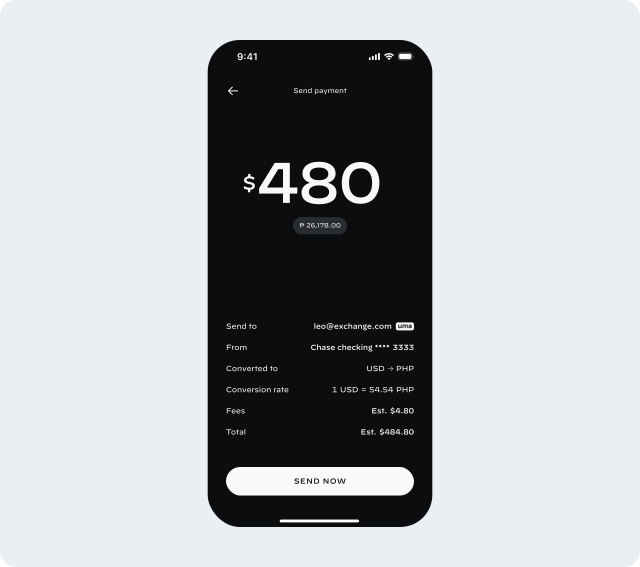
full example VASP implementation here.At this point, you can show the user a confirmation screen, including conversion rates, etc.