
Webhooks
Lightspark provides a set of webhooks, or callbacks, that you can subscribe to in order to receive near real-time updates on what happens on your account.
They are particularly useful to listen to asynchronous operations (such as withdrawing funds) or incoming events (such as receiving a payment).
They are also critical to the remote signing flow described in the Remote Signing section.
Lightspark currently provides webhooks for the following events:
- Node status changed: if your account's node has a status change (goes offline, comes back online, etc.).
- Payment finished: if a lightning payment completes, including both incoming and outgoing payments. The
entity_idfield will contain the payment ID which can be queried to get details. - Withdrawal finished: if withdrawal to an L1 address completes, including all result types (success, failure).
- Funds Received: if a deposit completes, including all result types (success, failure).
- Wallet status changed: if any of your wallet has a status change (goes offline, comes back online, etc.).
- Wallet outgoing payment finished: if outgoing lightning payment from any of your wallet completes, including all result types (success, failure).
- Wallet incoming payment finished: if incoming lightning payment to any of your wallet completes, including all result types (success, failure).
- Wallet withdrawal finished: if withdrawal from any of your wallet completes, including all result types (success, failure).
- Wallet funds received: if deposit to any of your wallet completes, including all result types (success, failure).
- High/Low balance: you can define a threshold and Lightspark will trigger a webhook if your available_to_send_balance goes over/under that threshold. The webhook only triggers at most once per hour, whenever the balance changes (because a payment is sent or received).
- Remote Signing requests for sensitive operations.
During configuration, Lightspark provides an additional field to add a dedicated endpoint specifically for Remote Signing events.
If a dedicated endpoint is not specified, these events (if enabled) will be sent to the primary endpoint.
- Create a webhook endpoint on your local server.
- Configure the webhook.
- Handle requests from Lightspark:
- Verify the event's signature.
- Parse incoming events.
- Return a
2xxresponse.
- Deploy your webhook endpoint.
Choose a URL path (here we chose
/webhook) and create a webhook endpoint on your local server. Make sure to accept POST HTTP requests.// Using an Express server:
const express = require('express');
const app = express();
app.post("/webhook", (req, res) => {
res.send("OK!");
});
app.listen(3000, () => {
console.log("Server listening on port 3000");
});
Configure your webhook settings in the API Config Page where you set up your API tokens.
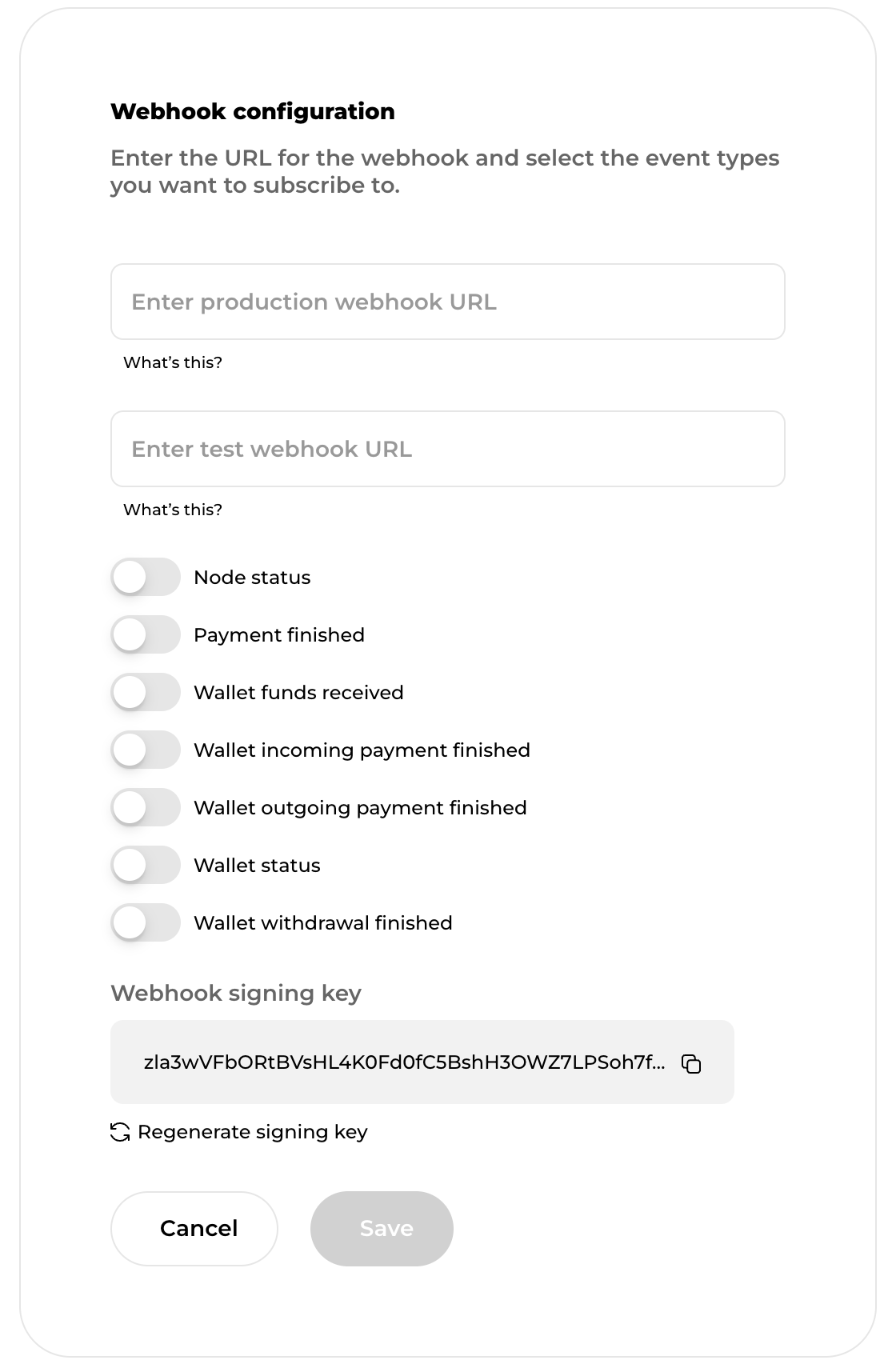
- Select the events you want to subscribe to
- Choose URLs for your webhooks (you may choose different ones for test mode and production mode)
- Get the webhooks signing key that is required to verify the authenticity of the incoming events
For every incoming request, you should:
- Verify the event's signature. You’ll want to make sure that the event is coming from Lightspark. Since your endpoint will be public on the internet, it is important to verify the authenticity of the message you receive.
- Parse the event itself. You want to access the data that was sent and determine which event you received.
Once the event is parsed, you can check the
event.event_type field to determine what you should do.
Since events are asynchronous, you can access event.timestamp to get the real time of when the event happened.
Finally, the event.event_id is a unique key to identify this event.{
"timestamp": "2023-03-30T19:16:25.273202+00:00",
"event_type": "NODE_STATUS",
"api_version": "2023-09-13",
"event_id": "0187542e-86eb-f96b-0000-ec20c64dfad1",
"entity_id": "LightsparkNode:0185789d-9948-f96b-0000-4ae0b696c75f"
}
Note that as the API evolves more fields may be added to the webhook data so your code should be resilient to unknown fields appearing in the request.
IMPORTANT: Your endpoint MUST return a
2xx HTTP status code in a timely manner.
If we don't get that response, Lightspark will retry sending the event a few times.
It is good practice to store the event in your database or in a queue, to respond quickly to Lightspark,
and to process the event in another thread, outside of the HTTP request lifecycle.import express from "express";
import {
WebhookEvent,
WebhookEventType,
WEBHOOKS_SIGNATURE_HEADER,
verifyAndParseWebhook
} from "@lightsparkdev/lightspark-sdk";
const app = express();
app.post("/webhook", (req, res) => {
const event = await verifyAndParseWebhook(
req.body,
req.headers[WEBHOOKS_SIGNATURE_HEADER],
({}).LIGHTSPARK_WEBHOOK_SIGNING_KEY
);
if (event.event_type === WebhookEventType.NODE_STATUS) {
const node_id = event.entity_id;
// You can now fetch the details of the node using the SDK
} else if (event.event_type === WebhookEventType.WALLET_INCOMING_PAYMENT_FINISHED) {
const paymentId = event.entity_id;
const walletId = event.wallet_id;
// You can now fetch the details of the payment using the SDK or notify the user via
// their wallet ID.
}
res.send("OK!");
});
app.listen(3000, () => {
console.log("Server listening on port 3000");
});
If you are using a language we do not support, look at the "Manually verifying events" section below.
We plan to support more languages soon, do not hesitate to contact us to inquire about the status of a language library.
Now that you are ready to handle incoming webhooks, you can deploy your endpoint on the public internet,
at the URL you specified in step 2. If you'd like to test your endpoint first,
we recommend using a solution such as ngrok to forward public internet traffic to your local development machine.
Make sure that your endpoint has an HTTPS URL. We will not send webhooks on a non-secure HTTP connection.
We strongly recommend using one of our SDKs to verify events. We also plan to support more languages soon, do not hesitate to contact us to inquire about the status of a language library. That being said, we recognize that you may use a language we do not support so this section will describe how to verify the signature in any language.
- Compute an hash-based message authentication code (HMAC) with the SHA256 hash function, using the webhook signing key as the key, and use the HTTP payload string as the message.
- Fetch the signature sent by Lightspark from the
lightspark-signatureHTTP header. - Compare the two values. If they don't match, it means that Lightspark is not the sender of the event and you should discard it.
To illustrate this process, below are code samples:
  import { createHmac, timingSafeEqual } from "crypto";
  /**
  * Verifies whether the signature in the header matches the data in the request,
  * given a signing key.
  *
  * @param requestData the POST message body received in the webhook.
  * @param headerSignature the content of the `lightspark-signature` header.
  * @param webhookSigningKey the webhook singning key configured in the
  *     Lightspark API configuration.
  * @throws An Error if the message signature is invalid.
  */

  const verify = (
    requestData: Uint8Array,
    headerSignature: string,
    webhookSigningKey: string,
  ) => {
    const sig = new Uint8Array(
      createHmac("sha256", webhookSigningKey).update(requestData).digest()
    );
    const digestBytes = new Uint8Array(Buffer.from(headerSignature, "hex"));
    if (
      digestBytes.length !== headerSignature.length / 2 ||
      sig.length !== digestBytes.length ||
      !timingSafeEqual(sig, digestBytes)
    ) {
      throw new Error("Webhook message hash does not match signature");
    }
  };
Webhooks follow the versioning pattern of the general API.
Each webhook event contains the field
api_version that you can refer to. Note that more fields can be added to the payload without notice as it is not a breaking change so your implementation must accept unknown fields.Note that webhook events are not designed for long term use. They should be consumed in a timely manner. If you install a new version of the SDK and try to consume old, unsupported, event payloads, you may encounter failures.