
Remote Signing
NOTE: This page is only relevant if your account has been configured to use remote signing. If you don't know what that is, it's likely this page is not relevant to you. If you think you might need remote signing, please reach out via slack or at support@lightspark.com.
Lightspark’s SDK allows you to keep your node’s keys entirely on your machines - Lightspark never sees or touches them!
In order to complete Lightning operations, Lightspark will periodically need to ask you for your signature or other metadata that only you know.
We use webhooks as configured in the Authentication section to contact your server when a remote signing operation is required.
The
event_type field for all remote signing events is WebhookEventTypeRemoteSigning.
They also all include a sub_event_type field in the additional data structure of the event object.
See below for a list of all remote signing events and the additional data they include for validation purposes.Inside of your webhook request handler, you’ll likely have a switch statement which looks at the
event_type and takes an appropriate action.
From there, for remote signing events, the SDK makes it simple to add necessary signatures and issue the corresponding GraphQL request for the event:import express from "express";
import {
AccountTokenAuthProvider,
LightsparkClient,
RemoteSigningWebhookHandler,
WebhookEvent,
WebhookEventType,
WEBHOOKS_SIGNATURE_HEADER,
verifyAndParseWebhook,
hexToBytes,
} from "@lightsparkdev/lightspark-sdk";
import {
EnvCredentials,
getCredentialsFromEnvOrThrow,
} from "@lightsparkdev/lightspark-sdk/env";
const app = express();
app.post("/webhook", (req, res) => {
const webhookEvent = await verifyAndParseWebhook(
req.body,
req.headers[WEBHOOKS_SIGNATURE_HEADER],
({}).LIGHTSPARK_WEBHOOK_SIGNING_KEY
);
switch (webhookEvent.eventType) {
case WebhookEventType.REMOTE_SIGNING:
const credentials = getCredentialsFromEnvOrThrow();
const lightsparkClient = new LightsparkClient(
new AccountTokenAuthProvider(
credentials.apiTokenClientId,
credentials.apiTokenClientSecret
),
credentials.baseUrl
);
const validator = {
should_sign: (webhook: WebhookEvent) => true,
};
const remoteSigningHandler = new RemoteSigningWebhookHandler(
lightsparkClient,
hexToBytes(({}).RK_MASTER_SEED_HEX),
validator
);
const result = remoteSigningHandler.handleWebhookRequest(
req.body,
req.headers[WEBHOOKS_SIGNATURE_HEADER],
({}).RK_WEBHOOK_SECRET
);
break;
default:
call.respond(HttpStatusCode.OK);
return "Unhandled webhook event type " + webhookEvent.eventType + ".";
}
});
The
HandleRemoteSigningEvent function will complete necessary signatures or cryptographic operations and send the corresponding graphql
request to Lightspark with required information. You can also manually inspect the webhook event’s data field for validation or to better
understand the events you’re receiving. See the "Remote Signing Event Details" section below for more information on each event type.We have added some test webhook events to enable easier unit testing for your webhook integration as you get started.
It is recommended to start testing using these test events before issuing SDK calls to make it easier to debug any potential issues.
You can issue these tests from the API configuration page by selecting “Send test event”:
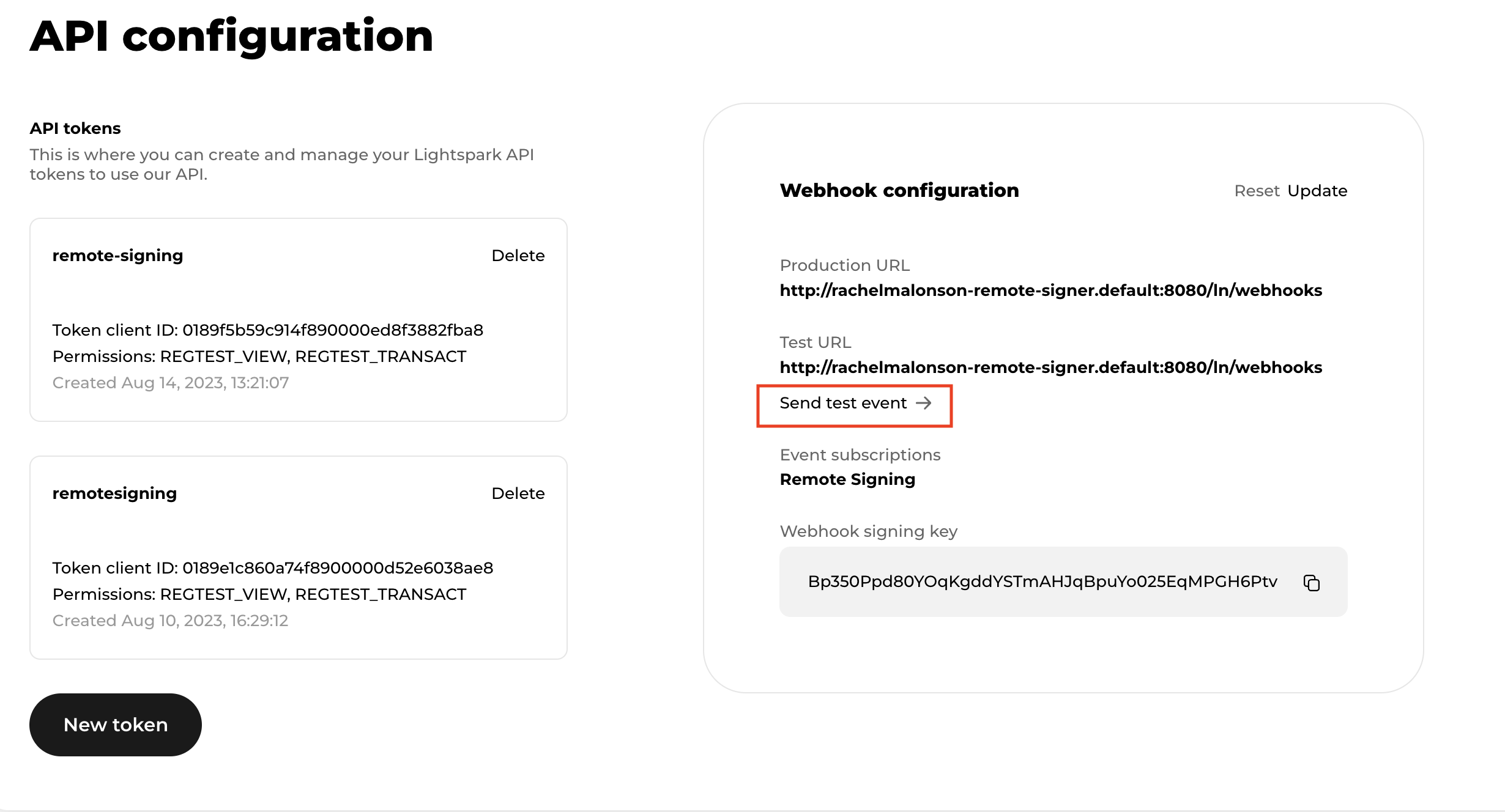
From there you can select “Remote signing” for the webhook event type and send a test webhook event for each subevent type
to ensure that your webhook is receiving the events correctly and that the correct calls are being issued to our service in response.
There is a timeout of ~10 seconds for each call.
As a user of the Lightspark SDK, the
handleRemoteSigningEvent function described above is all you need to use to handle remote signing within your webhook handler.
However, if you are interested in what is happening under the hood, or if you are implementing your own custom remote signing solution, this section is for you.Below is the list of remote signing webhook events you’ll receive from Lightspark, as well as the graphql request triggered to Lightspark in response to these events.
Note that for all of these, the
entity_id field will be the relevant Node ID or Channel ID.This event means your node needs you to sign some Lightning operation. We include some state and metadata
required for you to validate the payload we're asking you to sign.
Event data
data: {
    sub_event_type: "DERIVE_KEY_AND_SIGN",
    bitcoin_network: BitcoinNetwork,
    signing_jobs: SigningJob[],
}

interface SigningJob {
    id: string;
    derivation_path: string;
    message: string;
    add_tweak?: string;
    mul_tweak?: string;
    is_raw: boolean;
    per_commitment_point_idx: bigint;
    script: string;
    transaction: string;
    amount: bigint;
}
When the node requests a signature from the signer, the data needed to compute the bitcoin transactions sighash
is sent to the signer so that the signer can validate what is being signed. The derivation path, additive tweak and multiplicative tweak
are specified in order for the signer to prepare the correct private key with which to sign.
The 32 byte hash which is ECDSA signed is computed as per BIP143.
The main component of the message to be signed is the raw, unsigned bitcoin transaction
tx_to_sign.
BIP143 sighashes also require data that is not directly available in the transaction itself:
the output script of the input being signed, and the number of satoshis (value) of that input.
These two elements are provided, allowing the sighash to be reconstructed and signed.GraphQL Request
If validation passes, each
signing_job is signed and the signatures are sent to Lightspark in the following GraphQL request:mutation SignMessages(
$signatures: [IdAndSignature!]!
) {
sign_messages(input: {
signatures: $signatures
}) {
...SignMessagesOutputFragment
}
}
If validation fails, the payload IDs are sent in this request instead:
mutation DeclineToSignMessages($payload_ids: [ID!]!) {
  decline_to_sign_messages(input: {
    payload_ids: $payload_ids
  }) {
    ...DeclineToSignMessagesOutputFragment
  }
}
Transactions that fail validation will not be signed and the channel will be force closed.
This is triggered when you are creating an invoice.
Bolt11 invoices require a
payment_hash that is the SHA2 256-bit hash of the payment_preimage that will be given in return for payment. Please note that invoice_id can be for either type Invoice or Bolt12Invoice.Event data
data: {
    sub_event_type: "REQUEST_INVOICE_PAYMENT_HASH",
    invoice_id: string,
    bitcoin_network: BitcoinNetwork,
}
GraphQL Request
The preimage is computed by applying a random number nonce tweak to your master seed and the payment hash is provided to Lightspark in a request like:
mutation SetInvoicePaymentHash(
  $invoice_id: ID!
  $payment_hash: Hash32!
  $preimage_nonce: Hash32!
) {
  set_invoice_payment_hash(input: {
    invoice_id: $invoice_id
    payment_hash: $payment_hash
    preimage_nonce: $preimage_nonce
  }) {
    ...SetInvoicePaymentHashOutputFragment
  }
}
Note: The preimage nonce is returned along with the payment hash - this is needed so that when the preimage is later requested to be released, Lightspark can provide the nonce so you can recompute the preimage.
This is triggered when a payment is successfully completed and it is time to release the preimage.
The receiver (payee) can then use it as proof of payment. Please note that invoice_id can be for either type Invoice or Bolt12Invoice.
Event data
data: {
    sub_event_type: "RELEASE_PAYMENT_PREIMAGE",
    bitcoin_network: BitcoinNetwork,
    invoice_id: string,
    preimage_nonce: string, // hex-encoded
}
GraphQL Request
The preimage is recomputed using the nonce that was provided when creating the invoice and is returned in a request like:
mutation ReleasePaymentPreimage(
  $invoice_id: ID!
  $payment_preimage: Hash32!
) {
  release_payment_preimage(input: {
    invoice_id: $invoice_id
    payment_preimage: $payment_preimage
  }) {
    ...ReleasePaymentPreimageOutputFragment
  }
}
Event data
data: {
    sub_event_type: "RELEASE_PER_COMMITMENT_SECRET",
    per_commitment_point_idx: bigint,
    derivation_path: string,
    bitcoin_network: BitcoinNetwork,
    node_id: ID,
}
GraphQL Request
The expected request format is:
mutation ReleaseChannelPerCommitmentSecret(
  $channel_id: ID!
  $per_commitment_secret: Hash32!
  $per_commitment_index: Long!
) {
  release_channel_per_commitment_secret(input: {
    channel_id: $channel_id
    per_commitment_secret: $per_commitment_secret
    per_commitment_index: $per_commitment_index
  }) {
    ...ReleaseChannelPerCommitmentSecretOutputFragment
  }
}
The event data is the same as
RELEASE_PER_COMMITMENT_POINT:Event data
data: {
    sub_event_type: "GET_PER_COMMITMENT_POINT",
    per_commitment_point_idx: bigint,
    derivation_path: string,
    bitcoin_network: BitcoinNetwork,
    node_id: ID,
}
GraphQL Request
The expected request format is:
mutation UpdateChannelPerCommitmentPoint(
  $channel_id : ID!
  $per_commitment_point : PublicKey!
  $per_commitment_point_index : Long!
) {
  update_channel_per_commitment_point(input: {
    channel_id: $channel_id
    per_commitment_point_index: $per_commitment_point_index
    per_commitment_point: $per_commitment_point
  }) {
    ...UpdateChannelPerCommitmentPointOutputFragment
  }
}
This event is sent when the counterparty node reveals their per-commitment secret. In the event of counterparty node cheating,
you can use this secret to sign the justice transaction to claim all the funds in this channel.
Event data
data: {
    sub_event_type: "REVEAL_COUNTERPARTY_PER_COMMITMENT_SECRET",
    bitcoin_network: BitcoinNetwork,
    per_commitment_secret_idx: bigint,
    per_commitment_secret: string,
    node_id: ID,
}