
Creating & Paying Offers
NOTE: BOLT 12 support is accessible through our Lightspark Go SDK on version 0.16.0 (Coming soon) on our Remote Signing nodes. Support for the rest of our Lightspark SDKs and Lightspark OSK nodes will be available in the coming weeks.
In this guide, we will quickly explain what BOLT 12 is, what benefits it provides for you, and lastly how to create and pay offers using the Lightspark SDK.
BOLT 12 is a Lightning Network specification which allows users to create a new concept called an "offer", which is a novel way to request and pay invoices. The Official BOLT 12 Website explains the three main benefits of BOLT 12: reusable payment requests, increased receiver privacy, and censorship resistance.
In short, offers act as "static" invoices on the lightning network. They provide flexibility by allowing a user to create a singular offer to create multiple payment requests for potential customers. Compared to BOLT 11 invoices which are single use, offers can be standalone and be used multiple times throughout its lifetime. You could imagine a cafe that creates an offer for their shop, and customers use the offer to pay the coffee shop multiple times over the course of a day, month, or even years.
The availability of BOLT 12 supported wallets is continuing to grow. In order to complete a payment with offers, please double check that the wallet you are using supports BOLT 12. The BOLT 12 Website has a list of wallets that support BOLT 12. If using another wallet, please check their documentation to see if they support BOLT 12.
Offers solve a similar issue to LNURL: allowing users to create a singular, reusable point of entry for payment requests. The key difference though relies in their message format. While LNURL is built on top of HTTP, offers are built on top of a new approach called onion routing. Onion routing is a new method that leverages encryption to allow for more privacy when communicating in the lightning network. LDK has great documentation that goes into onion routing in more detail. LNURL excels in its availability, but offers provide more anonymity. If privacy or native implementation is preferred, offers do provide notable benefits.
BOLT 12 introduces three new types within the Lightspark framework: Offers, InvoiceRequests, and Bolt12Invoices. In the Lightspark framework, Bolt12Invoices are generated as payment requests from an Offer. Please note that Offers are not considered payment requests themselves. Thus, querying for relevant PaymentRequests will return generated Bolt12Invoices. Please see our API Reference for more information on the publicly facing fields that each one of these take. These three new types enable two new mutations as well:
CreateOffer and PayOffer which are fully supported in Lightspark's Remote Signing nodes.Similar to other implementations of BOLT 12, Lightspark encoded offers are encoded using the BOLT 12 specification. Once decoded, the offer contains all the necessary information for the sender to complete the payment accurately and securely. It is important to note that offers can be reused multiple times and can be associated with multiple unique InvoiceRequest and Bolt12Invoice. Below is an example of an offer. All encoded offers per the BOLT 12 specification are prefixed with
lno.lno1dp3wqkrkpp5qqfhmmv0evgq99ud5zpk9336t5gusat044tf4vhs6dm62qvz4swqdqqcqzpgxqyz5vqsp5s25rl2su05pkrd99ph95ja8v45j4gwd7m8k4t32fe79ncxx6eldq9qyyssqm52ke54wpfaaz72q6wnchfv4dy7233rja4c9578ddxxx2lrsmd83vr4e5dz0rwgcy9yfqvv9y0539mge2rkw9837vpxx4k8kq6r23tgq9u2f96
All encoded InvoiceRequests are prefixed with
lnr. The main use-case for invoice requests is to act as a response to paying an offer. When someone calls the PayOffer mutation, the receiver creates an equivalent BOLT 12 invoice to send back to the payer. The invoice request contains valuable information that tells the receiver where to send back the valid invoice to. All communication is done through onion messages, increasing anonymity on both sides. Below is a great sequence diagram from LDK of how the End-to-End flow works: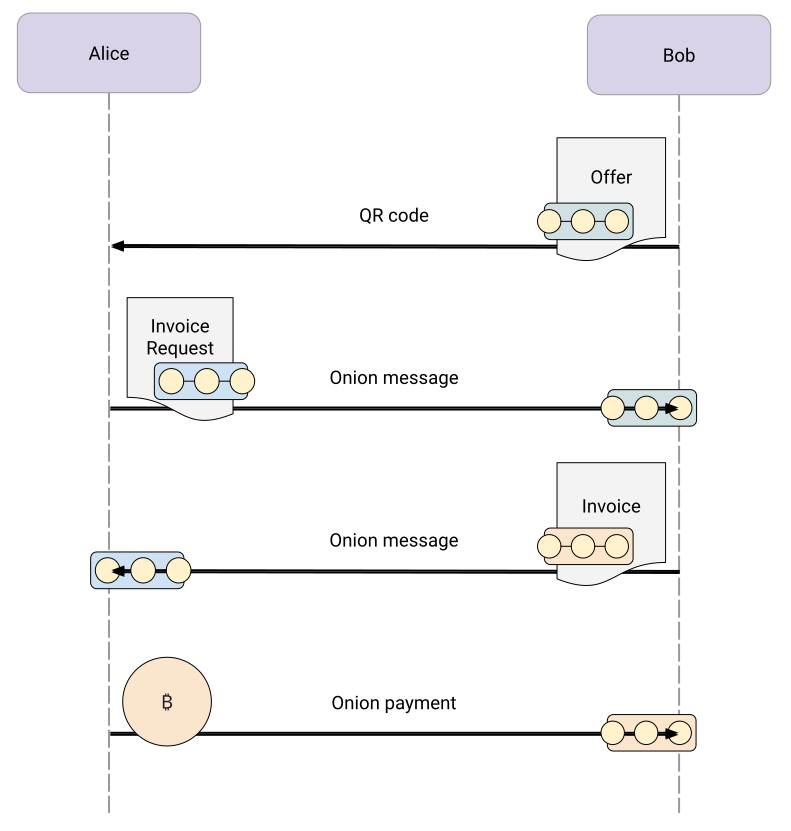
Below is an example of how to create an offer for 100,000 millisatoshis (0.000001 BTC) with the description "Coffee shop tip.". The
createOffer function returns a String representing the encoded offer.offer, err := client.CreateOffer(
nodeId,
100000,
"Coffee shop tip.")
Per the BOLT 12 specification, offers do not need to specify an amount. This is a special type of offer that allows the sender to specify the amount they want to pay. Similar to invoices, this is most useful for scenarios such as tipping or donations. In the case that the offer does not send an amount, we will automatically calculate the amount based on the amount in the invoice request. If the amount is set by the offer, the invoice request amount must be equal to the offer amount.
Paying an offer is just as easy. Simply call the
PayOffer mutation with the encoded offer you want to pay. This mutation will return an OutgoingPayment object, which you can use to track the status of the payment. Please note that two of the fields are optional: amountMsats and idempotencyKey. If the offer you are paying has no amount specified, you must specify amountMsats. However, if an amount is specified by the offer, amountMsats must be either unspecified or match the offer amount exactly. If you do not specify an idempotencyKey, we will automatically generate one for you.outgoingPayment, err := client.PayOffer(
nodeId,
encodedOffer,
timeoutSecs,
maximumFeesMsats,
amountMsats,
idempotencyKey)
During the time we process the outgoing payment, two fields will be updated once the payment is sent. The first is
status, which will be set to PENDING and eventually updated to SUCCEEDED or FAILED. The second is payment_hash, which will be updated once we receive the payment_hash from the remote signer. OutgoingPayments for invoices and offers are identical. You can use the event.entity_id field to query the OutgoingPayment object. This object contains detailed information about the transaction, including its current status, amount, and more. You can find the full schema of this object in the Lightspark SDK documentation.Here's how you query for an OutgoingPayment:
func handlePaymentFinished(paymentId string) {
    entity, err := client.GetEntity(paymentId)
    if err != nil {
        log.Printf("Error fetching payment: %v", err)
        return
    }
    if outgoingPayment, ok := entity.(*objects.OutgoingPayment); ok {
        fmt.Printf("Payment status: %s\n", outgoingPayment.Status)
        fmt.Printf("Amount sent: %d\n", outgoingPayment.Amount.OriginalValue)
    }
}